

This release expands BoldAgent across the full life of an agent: how you build it, how you put it in front of people, and how you operate it once it's live. Agents can now coordinate with other agents, present interactive responses, run on a schedule and pause for human approval, while new operational tools show you where knowledge is missing, what conversations reveal, and what every agent costs.
Build
AI Agent Builder
Create, configure and publish AI agents from a single no-code workspace.
Configuration runs down the left (Instructions, Libraries, Skills, Decision Models, AI Tools, Context and Settings) with a live Playground on the right, so every change can be tested in the same screen where you made it.
What's included
- Generate using AI drafts instructions from a short description, and Improve Instruction sharpens what you already have.
- Insert Placeholders pulls user fields, conversation fields and context into instructions, so one agent adapts to whoever is asking.
- Model configuration covers the model, output token limits, reasoning effort and verbosity, and how much conversation history and retrieved knowledge each answer uses.
- Response format returns natural language, raw JSON, or structured output constrained by a schema you supply.
- Context passes user fields, conversation fields, standing context, and the current page URL and date-time into every run.
- The agent list adds search, category filters, All / Drafts / Published views and sorting.
Knowledge Libraries
Connect documents, URLs and Q&A to give agents trusted knowledge.
Each library has its own embedding model and four source types:
| Source | What it's for |
|---|---|
| Files | Upload documents with configurable chunk size and overlap, and track indexing status per file |
| Website | Crawl a site, review crawled pages, exclude what you don't want indexed, and re-sync a page or the whole source |
| Q&A | Author exact answers where retrieval isn't precise enough |
| Knowledge Base | Bring in your existing KB articles |
What's included
- Open any file to inspect its chunks exactly as the agent sees them, the fastest way to find a table split across chunks or a heading separated from its text.
- One library can serve many agents, and a change to it reaches all of them.
Skills
Extend agents with reusable skills and specialised instructions.
What's included
- Skills are versioned packages, a
SKILL.mdand its supporting files, linked to any number of agents. - Each skill shows its published and latest versions, category, owner, package size and the agents using it.
- Upload a new version and every linked agent picks it up. Deleting a skill unlinks it from its agents automatically.
- The Plugins catalogue offers ready-made skills that document what they do, what they deliberately don't do, example requests, required capabilities, and which sections are safe to edit.
AI Agent Version Control
Manage agent versions, publish updates and maintain controlled releases.
What's included
- Every agent is a set of numbered versions. You edit a draft, test it, then publish it.
- Add a fresh version or clone any earlier one.
- Each version is labelled Draft, Currently published or Previously published, with who changed it and when.
- Some changes, such as enabling human approval, automatically create a new draft rather than altering the published version.
Agent Evaluation
Run test datasets against agents to measure quality and detect regressions.
What's included
- Run each dataset against a chosen agent version, scoring answers by semantic similarity against a pass threshold you set.
- Run results show pass rate, passed and failed counts, and average score.
- Compare against the initial run or the previous run to see whether a change helped.
- Filter test cases by passed, failed, errored and not run.
- The dataset list flags each dataset as failing, at risk, healthy or never run.
Manager Agent
Coordinate multiple specialised agents to handle complex requests.
Turn any agent into a Manager Agent under Settings → Agent Orchestration, and it can delegate to up to ten Worker Agents. Each worker owns one responsibility, carries out the task assigned to it, and returns the result to the manager.
How it works
- Adding a worker takes two things: the agent itself and usage instructions describing how it should be used.
- The manager reads those usage instructions to decide where to route each request, so a precise description of each worker's remit means more reliable routing.
- Workers are ordinary agents. Each keeps its own instructions, knowledge, tools and settings, and can be used on its own elsewhere.
Use it for: support flows that separate policy answers from order actions, research tasks split across specialists, or any request too broad for one agent to handle well.
Interactive Agent Responses (A2UI)
Agents can present interactive interfaces and structured UI components as part of their responses.
Instead of answering only in text, an agent can return interface elements that people interact with directly in the conversation.
Use it for: guiding people through choices, collecting structured input, and presenting results in a form that's easier to act on than a paragraph of text.
Connect
Agents are most useful when they can reach the tools, systems and data your business already runs on. This release adds built-in tools, a secure code sandbox and background execution alongside MCP and API integrations.
MCP Servers
Connect agents to external tools and services through Model Context Protocol.
What's included
- Register a server with its URL, transport type and authentication, including full OAuth with callback handling and re-authentication when credentials lapse.
- Add usage criteria describing when an agent should reach for the server.
- Use servers from your own infrastructure or the marketplace.
- Enable or disable each tool individually per agent.
API Connections
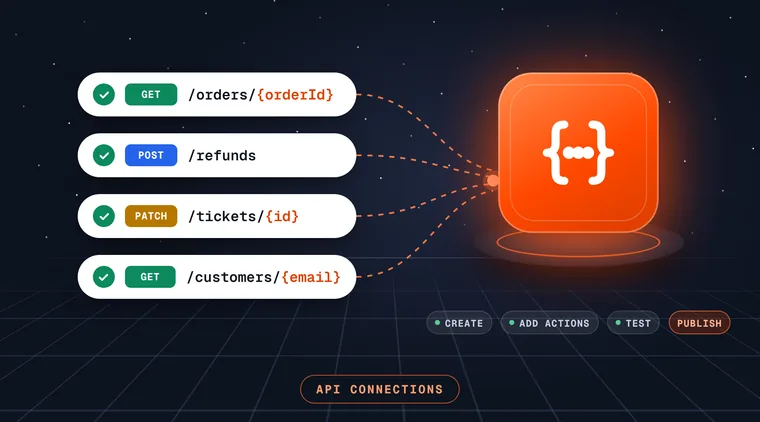
Let agents interact with external APIs and business systems, without an MCP server in front of them.
What's included
- A three-step flow: Create (base URL, categories, authentication and headers, with header values masked once saved), Add Action (the endpoints to call) and Test and Publish.
- Variables in the URL or request body, so one action covers every case instead of one action per value.
- Connections listed with server URL, creator and last modifier, and searchable and filterable by category.
- Link a published connection to an agent under AI Tools → API Actions.
Built-in Tools
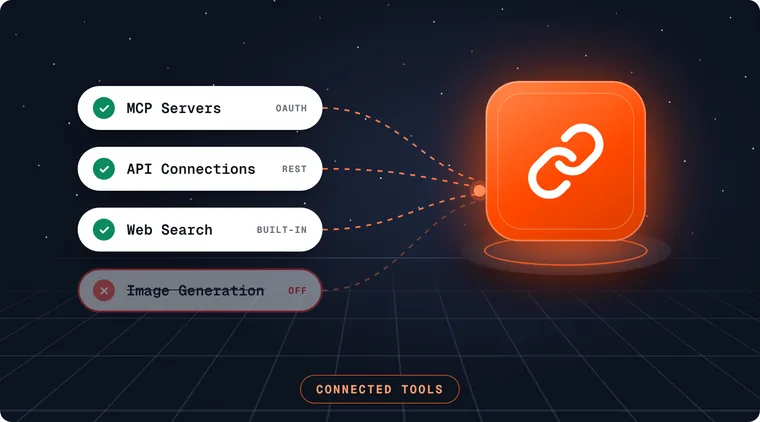
Give agents everyday capabilities without connecting anything. Four tools ship with the platform and are toggled per agent.
| Tool | What it lets an agent do |
|---|---|
| Web Search | Look up current information on the web |
| Web Fetch | Read a specific page the agent has been pointed at |
| File Generation | Produce downloadable files as part of an answer |
| Image Generation | Create images, with a selectable image model |
Use it for: answering questions that depend on current public information, reading a page a user shares, or returning a finished file instead of text to copy and paste.
Sandbox Code Execution
Let an agent write and run code in an isolated sandbox to compute answers, validate output or reproduce errors, rather than reasoning its way to a number and hoping.
How it works
- Each sandbox is short-lived and isolated to a single run.
- Files and installed packages are discarded when the run ends, so nothing carries over between runs.
- You choose the environment, and that choice applies to every sandbox run of the agent.
Use it for: totals, percentages, pro-rated amounts and price comparisons; validating structured output before it's returned; reproducing an error before suggesting a fix.
Background Execution
Let agents keep working on long-running tasks instead of being tied to a single request.
What's included
- Agents continue working on a task after the request that started it, rather than being limited by it.
- Through the Developer API, submit a message as a background run that you can poll for its result or cancel.
- Works with Scheduled Tasks, so recurring work can run without anyone waiting on it.
Use it for: research, multi-step analysis and processing work that takes longer than a typical chat reply.
Govern
More capable agents need clearer boundaries. This release brings policy-based guardrails, grounded answers, human approval, run-level tracing, credential protection and a full audit trail together in one place.
Responsible AI
Apply guardrails and oversight for safe agent behaviour.
Build a policy once and apply it across agents to keep them secure, fair, private and reliable.
| Group | Checks |
|---|---|
| Security | Prompt injection detection, which detects and blocks prompt injection attempts. Leakage detection, which detects sensitive data in user inputs |
| Privacy | Secrets detection, for credentials, API keys and tokens in requests and responses |
| Content moderation | Toxic content, bias, hate speech, adult content and profanity |
| Violation message | The response shown when a request breaches the policy |
What's included
- Each check is toggled independently, so a policy can be strict about credentials and relaxed about profanity, or the reverse.
Grounded Responses
Keep agents strictly within what they know.
Turn on grounded response only and the agent answers strictly from available knowledge. When nothing relevant is found, it returns your fallback message rather than filling the gap with something plausible.
What's included
- A fallback message you write, such as pointing people to your team.
- A custom error message for when a request can't be completed.
- A cap on how many tool-calling iterations a single request may run, so a confused run can't loop.
Use it for: policy, compliance, product and pricing answers, where an invented detail is worse than no answer.
Human-in-the-Loop Approvals
Require human review and approval before agents take sensitive actions.
How it works
- Write the condition into the agent's instructions, such as "Request approval before issuing any refund over $100."
- When a request meets the condition, the conversation pauses for a reviewer.
- The reviewer can approve the pending action, edit it before it runs, reject it, or respond directly to the person instead.
- The conversation then continues from where it stopped.
- Enabling human approval creates a new draft version, so the published agent is unaffected until you publish.
Use it for: refunds, record changes, outbound messages, access requests and any action with financial, legal or security consequences.
Trace Logging
Record what actually happened inside a run, controlled group by group.
| Group | What's recorded |
|---|---|
| LLM inputs | The user and assistant messages sent to the model, with full context |
| LLM outputs | Model responses, including text and tool call requests |
| Tool schemas | The definitions, parameters and input structure exposed to the model |
| Tool responses | The outputs returned by tools, including data and status |
Turn on what you need to diagnose a problem without logging everything by default.
Use it for: finding out why an agent gave an answer or called a tool, separating instruction, routing and data problems, and explaining an agent's actions to reviewers and auditors.
Credential Protection
Keep the keys to your systems safe as agents connect to more of them.
What's included
- Masked headers: HTTP header values in API Connections are masked once saved.
- Managed OAuth: MCP servers support full OAuth, with callback handling and re-authentication when credentials lapse.
- Scoped API keys: Developer API keys carry the permissions of the user who created them, so you scope an integration by choosing whose key it uses.
- One-time tokens: an API key's token is shown once, at creation.
- Secrets detection: Responsible AI policies detect credentials, API keys and tokens in requests and responses.
Audit Logs
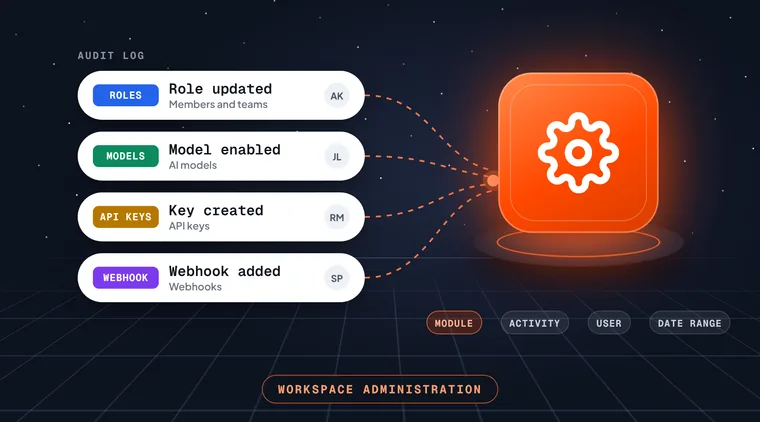
A complete record of every configuration and access change in your workspace.
What's included
- Entries for specific operations, such as an agent updated, a version cloned or published, or an API connection linked.
- The user, timestamp and full detail behind each entry.
- Filters by module, activity, user and date range.
Use it for: change reviews, internal audits, and answering "who changed this, and when?" in seconds.
Deploy
Deployment & Distribution
Publish and distribute agents with controlled access.
What's included
- Only the Currently published version of an agent serves real conversations.
- Choose the channel that fits each audience: the Chat Widget, the Agent Hub or the Developer API.
- Workspace administration covers Members and Teams, Roles and permissions, and API Keys, so you decide who can use, change and integrate each agent.
Widget Deployment
Embed agents into websites, portals and applications.
What's included
- Configuration across four tabs: Widget Appearance, Chat Experience, Preference and Share.
- Set the header title and description, brand colour, light or dark theme and launcher behaviour, all against a live preview.
- Share the widget publicly and copy either the embed script or the iframe snippet.
Agent Hub Distribution
Share published agents across teams through a central hub.
What's included
- Publish an agent and it appears on the hub, with no site changes, embedding or deployment.
- Every published agent is shown as a card with its avatar, name, description and a Chat Now action.
- Search across agents and mark frequently used ones as favourites.
- A full chat workspace for each agent, with conversation history and New chat on the left, the conversation in the middle, and a details rail on the right.
- Builders get a direct link back to the builder portal, so moving from using an agent to improving it takes one click.
- The hub carries your workspace name and branding.
Developer API
Integrate agents into your own applications.
What's included
- Everything in the product is available over REST: agents and versions, libraries and their sources, decision models, MCP servers, policies, conversations and runs.
- Receive a complete answer, stream it as server-sent events, or submit a background run you can poll or cancel.
- Messages accept text, files and images, carry additional context at message or conversation level, and can be attributed to one of your own end users.
- API keys carry the permissions of the user who created them, and the token is shown once, at creation.
Operate
Contact Management
Manage contacts and maintain their conversation history.
Keep a record of the people your agents talk to, with each contact's conversations in one place.
Use it for: seeing a customer's or employee's previous conversations before following up, and giving continuity across conversations.
AI Agent Cost & Usage Analytics
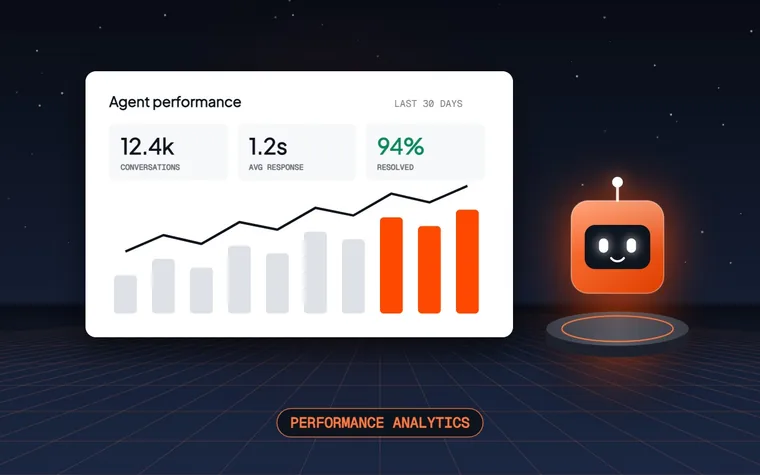
Monitor agent usage, token consumption and associated costs.
What's included
- Headline metrics for total credits, input tokens, output tokens and active agents, each trended against the previous period.
- Credit and token consumption over time.
- Credit usage broken down by model and ranked by agent.
- Latency trends, with average and P95 latency per agent.
- Filters by agent and date range.
Knowledge Gap Detection
Identify knowledge gaps and unanswered questions to improve agent responses.
A gap is recorded when the context relevance score falls below your threshold, meaning the retrieved content wasn't relevant enough to the question asked.
What's included
- Track how many gaps there are and how many conversations they affected.
- See gaps grouped into recurring themes.
- Track the proportion of gaps you've addressed as you add the missing content.
Use it for: deciding what to write next for your knowledge libraries, based on what people actually ask.
Scheduled Tasks
Run agents automatically at set times or intervals.
How it works
- Pick an agent, write the brief once, and choose when it runs: one-time, daily, weekly, monthly or yearly.
- Set a time and timezone, start and end dates, and a maximum run count.
- Preview the next three runs before saving.
- Each run starts a fresh conversation you can open afterwards.
Agent-created schedules: agents can also create their own schedules from within a conversation, within limits you set: which schedule types are allowed, how many schedules a conversation may hold, the minimum interval between runs, and how many consecutive failures pause a schedule automatically.
Good to know: a scheduled run executes the brief in one pass and can't ask clarifying questions, so write it as a complete instruction.
Use it for: weekly reports and briefs, recurring checks, and time-bound monitoring. Combined with Background Execution, scheduled work runs end to end without anyone waiting on it.
Webhooks
Trigger external workflows and receive event notifications through webhooks.
Push events from BoldAgent into your own systems, so the tools your teams already use can react to what agents do.
Use it for: notifying a team channel, updating a ticketing or CRM record, or starting a downstream workflow when an agent event occurs.
Conversation Insights
Analyse conversation patterns to identify improvement opportunities.
Look across conversations, rather than one at a time, to see recurring patterns in what people ask and how agents respond.
What it works with
- Conversations records every conversation with who asked, when, through which channel, and which agent version answered.
- Because the version is recorded against each conversation, you can tell whether an issue came from the configuration you're running now or the one you replaced.
Use it for: prioritising improvements to instructions, knowledge and tools based on real usage.
What you can build with this release
- Customer support that resolves, not just responds. A Manager Agent routes questions to a knowledge specialist and order actions to an operations specialist, with Human-in-the-Loop Approvals on refunds. Read the use case
- Pipeline from your pricing page. A widget-deployed agent answers buyers' questions, qualifies them, and sends structured lead records to your CRM through API Connections. Read the use case
- Weekly market intelligence. A Scheduled Task runs a research team every Monday and delivers a scored brief. Read the use case
- An employee assistant on the Agent Hub. HR and IT answers tailored by location and role, kept current with Knowledge Gap Detection. Read the use case
- Invoice processing through the Developer API. Invoices are read, checked and routed, with approvals for anything that needs a person. Read the use case
Benefits by role
| Role | What this release gives you |
|---|---|
| Agent builders | Multi-agent orchestration, interactive responses, reusable skills and version control in one workspace |
| Operations and support leads | Approvals for sensitive actions, scheduled work, contact history and insight into what people ask |
| Knowledge owners | Knowledge Gap Detection, chunk inspection and website re-sync to keep content complete and current |
| Developers | A full REST API with streaming and background runs, plus MCP servers, API Connections, built-in tools, a code sandbox and webhooks |
| Security and compliance | Responsible AI policies, grounded responses, human approval, trace logging, credential protection and audit logs |
| Finance and leadership | Cost and usage analytics by agent and model, and controlled releases |
Getting started with this release
- Review your published agents in the Agent Builder and clone a new draft for any agent you plan to update.
- Add Human-in-the-Loop Approvals to agents that take actions in your systems, and apply a Responsible AI policy to every customer-facing agent.
- Turn on grounded responses for agents that answer policy, pricing or compliance questions.
- Set a Knowledge Gap threshold and review the first set of gaps after a week of conversations.
- Build an evaluation dataset for each critical agent before making further changes.
- Try a Manager Agent wherever one agent is handling several distinct jobs.
Feedback
Tell us what's working and what you'd like next. Contact support